
Multi-agent systems in marketing
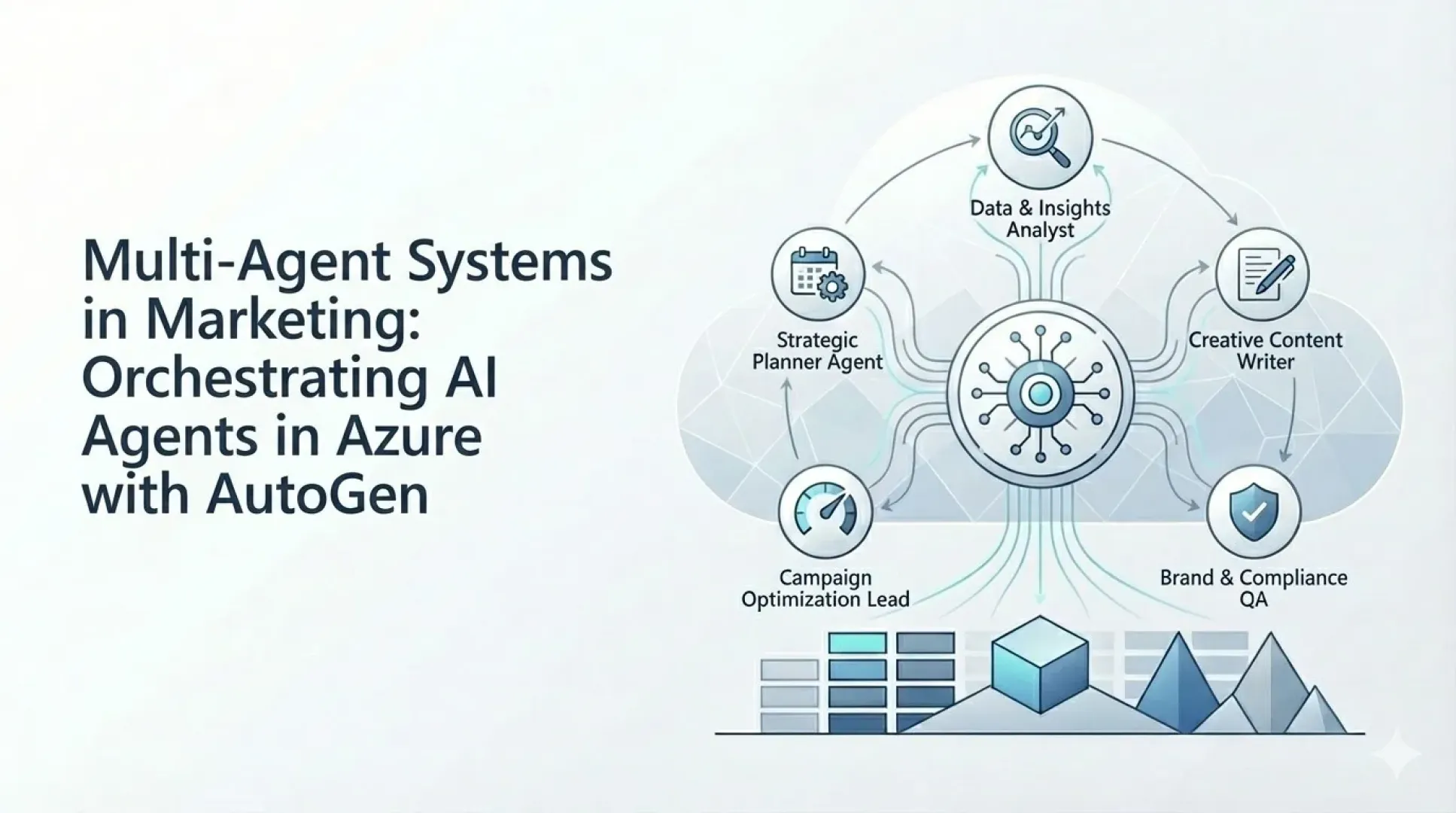
Orchestrating specialized AI agents in Azure with AutoGen
Multi-agent systems are shifting generative AI from a "single smart chatbot" to a team of specialized agents who divide up the work and collaboratively solve complex tasks. In marketing, this typically involves a combination of analytics, strategy, creativity, and execution—an area where a role-based approach naturally pays off.
Compared to the traditional approach of “prompting” a single model, the multi-agent approach offers a clearer division of labor, the ability to run tasks in parallel, and better control over the quality of outputs. From a management perspective, it is important that a multi-agent system can be designed as a repeatable process: the same brief, the same set of checks, and comparable deliverables (message variants, channel recommendations, summary of insights, risk checklist) .
What is a multi-agent system?
An agent is an AI model enhanced with an internal knowledge base and the ability to call functions or tools (e.g., querying data, generating output, triggering workflows). In practical terms, this means that an agent is not “just a text generator,” but can:
- search for context (e.g., brand guidelines, product specifications),
- work with data (segments, campaign performance, CRM signals),
- perform an action (create a draft, create a task, run a pipeline).
A multi-agent system consists of a set of agents with specific roles (e.g., planner, analyst, copywriter, quality controller) who communicate with one another and iterate on solutions. A key design element is that each agent has a clearly defined scope of responsibility and “rules of the game”: what resources it is permitted to use, what format it must return, and when it should escalate ambiguities to a human.
Why Azure and AutoGen?
Azure
Azure provides enterprise infrastructure and integration: orchestration (e.g., serverless), security, logging, scaling, and integration with data platforms and BI. In practice, another advantage is the ability to easily implement access control and auditing, as well as separate environments for development, testing, and production.
AutoGen
AutoGen (open source) simplifies the design of multi-agent collaboration: agents “converse” with each other about a task, exchange partial results, and an orchestrator manages the workflow. AutoGen is particularly well-suited for situations where you want to define roles, interaction rules, and checkpoints without forcing the entire process into a rigid workflow.
Typical architecture
- Orchestrator (control logic) – breaks down the task into steps, assigns roles, monitors stop conditions, and decides when to send the output to a person for approval.
- Set of agents – each has its own instructions, tools, and scope of access; there is often also a "reviewer" or "compliance" agent.
- Data layer – segmentation, campaigns, CRM/web analytics, product data; ideally in a unified model (lakehouse/warehouse). It is essential to have a “single source of truth” and traceability of sources.
- Integration and actions – publishing to channels (email, social media, website), triggering workflows, storing artifacts and metadata (who generated what and based on what data), and feeding results back into BI.
Recommendation: For marketing scenarios, it is advisable to implement a template library (prompt and brief templates, output structures, checklists) so that the system produces consistent outputs across campaigns.
Marketing scenarios where multi-agents make the most sense
- Campaign design “from brief to concepts”: the planner creates the campaign structure, the analyst adds insights from segments and performance data, the copywriter prepares copy for the channels, and the quality control specialist verifies consistency with the tone of voice and compliance. In the next step, the performance specialist can propose hypotheses for A/B tests.
- Personalization and micro-segments: The analytics agent prepares the segmentation logic and key motivators; the content agent generates message variations; and the QA agent monitors length, claims, and brand consistency. It is important to establish a consistent glossary (benefits, product claims, prohibited phrasing).
- Virtual focus group: Participants represent personas and provide quick feedback on a message, offer, or price. This is particularly useful during the prototyping phase (rapid iterations prior to A/B testing) and in situations where you need to quickly “test the waters.”
- Operational optimization: The "performance" agent evaluates campaign results and suggests adjustments to the budget, targeting, or creative assets. Ideally, it operates within predefined rules (guardrails) so that it does not override the strategy but instead proposes changes within the approved framework.
In addition, a consistency assistant has often proven useful in practice: an agent who ensures that the same offer is communicated consistently across all channels (terminology, discount terms, CTAs, UTM tracking).
Benefits for Management
- Speed (more options and iterations in less time, faster time-to-market).
- Scalability (parallel agent processing, cloud scaling).
- Reducing the team's workload (the agent handles routine tasks; people focus on strategy and decision-making).
- A more consistent process (roles and a control agent reduce randomness and increase reproducibility).
- Improved auditability (step logs, versioning of outputs, traceability of source documents).
Risks and How to Manage Them
- Output inconsistencies: These are addressed using a shared context, templates, a "reviewer/QA" agent, and rules. It is good practice to have a "single source of truth" (brief + data snapshot) for each campaign.
- Latency and costs: optimization of the number of iterations, caching, appropriate model selection based on the step (not always the most expensive model), and a clear policy for when the system should stop.
- The complexity of debugging: It is important to log agent conversations, create test scenarios, and roll out the system in phases (POC → MVP → production). It is advisable to separate “critical” components (data, compliance) from “creative” components.
How to Get Started in a Pragmatic Way
The "low-hanging fruit" approach works best: select 1–2 marketing processes with clear KPIs (e.g., campaign variant creation, virtual focus groups, assisted personalization), define agent roles, connect them to the data, and deploy them in Azure while measuring their impact.
Starter Kit
- Definition of the brief template and output formats (what the system should return).
- The first set of roles (planner + analyst + copywriter + QA).
- Connection to one or two data sources (segments and campaign performance).
- Impact measurement (time spent preparing the campaign, number of iterations, performance of variants).
In subsequent iterations, agents, data sources, and automation are added, as well as deeper integration into the marketing team’s workflow (approval, asset management, reporting).
Summary
Multi-agent systems make it possible to build an "AI team" that accelerates campaign preparation, improves the consistency of outputs, and paves the way for scalable personalization. The combination of Azure (enterprise operations) and AutoGen (roles and orchestration) provides a pragmatic foundation for both proof-of-concept (POC) and subsequent production deployment.